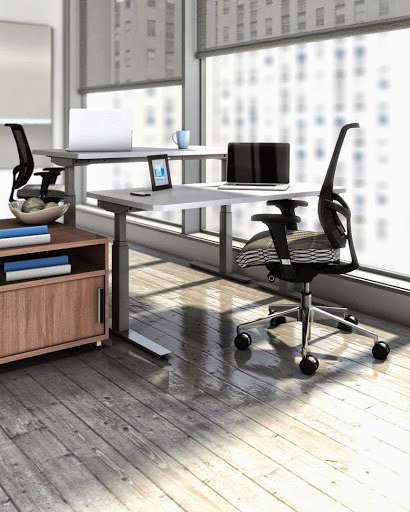
Fall Favorites: Eurotech Wau Chairs

Eurotech Seating Wau Chairs

Leave no doubt, Eurotech Wau chairs will have you saying WOW for real! This incredible seating collection offers high quality ergonomic features and modern design characteristics that will earn any work environment an abundance of daily compliments. In today's post, we'll be highlighting the awesome seating solutions from the Wau collection. Enjoy!

Style

Wau series office chairs by Eurotech offer a distinct modern look that's hard to miss. Available in a choice of fully upholstered or all mesh variations, Wau seating is versatile and down right cool. Both high and mid back models are available to meet your individual preferences. Chairs feature rear encasing style frame accents that add to the upscale appeal. This collection gets an A+ in the style department with it's truly unique look. Rest assured, their are no other chairs on the market quite like the Wau!

Colors

Eurotech Wau chairs are available in 3 color options. The all black, fully upholstered Wau chair is the most simplified of the bunch and an excellent choice for both home and business work environments. The white frame and charcoal mesh Wau chair is the most popular of the 3 and boasts a cutting edge modern vibe that's really trending in 2014. The black frame and charcoal mesh Wau chair is the best of both worlds and all around great choice for nearly any workplace application.

Features

Ergonomic features for days! Wau chairs are all about improving performance in the workplace. High back models feature an integrated mesh head rest for support during those long work days. All Wau series ergonomic task chairs are standard with adjustable arms and adjustable mechanisms for customizable comfort. The wide 5 star base provides excellent stability for both the all mesh and fully upholstered models. Wau chairs are also lightweight and require minimal effort to glide around the office.

Price

You just can't beat the price point of the Wau seating collection. In this competitive market it's nice to know that brands like Eurotech are still offering high quality desk chairs for shoppers not looking to spend thousands. The all mesh mid back Wau chair comes in at $438.50 while the fully upholstered high back model is slightly more expensive at $464.00. Never the less, you get a lot for your money with a Wau chair. You'll be hard pressed to find a more comfortable and adjustable seating solution at even twice the price.

Final Thoughts

This Fall, the Wau seating collection is sure to find itself amongst the industries big winners. With all the modern seating trends booming this year, the Wau is ahead of the curve. Wau chairs get the job done right on a budget while keeping users supremely comfortable and in style. A+
Blog, Updated at: 8:08 AM

Life In The Cube: A Guide To Cubicle Comfort

Stuck in a cubicle all day? Not to worry! In today's post we've outlined the tips, products, and advice needed to get you working effectively. From using your office chair properly to adding the right ergonomic accessories, the days of discomfort in the workplace are about to be a thing of the past!

Use Your Office Chair Properly

All too often office employees are stuck dealing with an inherited office chair that just doesn't cut it. That being said, if a new chair is out of the question, simple steps can be taken to boost your comfort. Start by determining the type, model, or style of chair you have. Take a quick pic if possible as a reference. Next, contact a reputable seating manufacturer and provide them with the best info you can on your specific chair. Ask about the adjustable features and obtaining instructions on proper use if available. Educating yourself on the benefits your chair offers and how to use them properly will help you find easily achieved support in a hurry. In most cases, simply adjusting your chairs height, arms, and back angle will make life in the cube much easier!

Get Organized

Take a look around your office. You'll no doubt notice a variety of clean and cluttered cubicles. During your visual scan take a look at the workers of each associated cubicle. Upon inspection you should notice that those with clean work spaces are working far more productively than those covered in clutter. Take the time to create a plan of attack for your own space and get started. Start by clearing your worksurface of unnecessary items, removing trash, and doing some basic cleaning. Next organize your file cabinets and office storage components using a system that works for you. Remember, getting organized is helpful, but keeping it that way provides long term benefits that lead to office success and comfortable work days.

Deskercise

Feeling a bit cramped in your cubicle? Don't hesitate to stand up and stretch every now and then. A variety of simple and easy deskercise activities are widely available online that will help you improve blood flow, motivation, and work day comfort. While simply stretching will do in most cases, taking a short walk might also be a good idea to help relieve some stress and anxiety generated from long days in your cubicle.

Eat Healthy

The power of a healthy lunch should not be under estimated. Eating fresh fruits, vegetables, and energy boosting foods will no doubt keep you working more efficiently than you would be after chomping down that double bacon burger. As fatigue is a common problem in the workplace that greatly relates to discomfort, foods packed with vitamins and nutritious benefits are a must. Try looking up some simple recipes and healthy eateries in close proximity to your office. Go healthy for one week and there will be no turning back!

Go Ergo

When all else fails, go ergo! The right combination of ergonomic office accessories will help you maximize your functionality and effectiveness in the workplace. Products like ergonomic monitor arms, foot rests, and adjustable workstations are all highly recommended my heath care professionals and provide excellent benefits that will no doubt be appreciated by any user. Basic ergonomic accessories like retractable keyboard trays cost under $200 and will improve your computing posture and blood flow while simultaneously helping you type faster throughout the day. The helpful ergonomic products available on the market today are simply to long. Try contacting an ergonomic products specialist or physician to help determine what products will work right for you. In the end, it's all about meeting your specific needs to achieve your peak comfort levels!
Blog, Updated at: 11:19 AM

The 7 Step Ultimate Ergofication Product Guide

Looking to create a high end ergonomic work environment? No problem! In today's article we'll be showcasing our 7 step ergofication process and the products you need to get the job done right. From super cool height adjustable desks to adjustable CPU holders, we have your every ergo office need covered. Enjoy!

Step 1: Choose An Adjustable Desk

Adjustable Height Desk

These days height adjustable ergonomic desks are the way to go. With the ability to quickly convert from sitting to standing applications, products like the new Global Total Office HE4824MSC adjustable desk offer the perfect way to start your ergonomic space. These versatile desks are available in a wide variety of finish options to accent your workplace decor and provide the high quality features needed to reach peak levels of performance. In addition to the HE4824MSC from Global, manufacturers like Ergonomic Concepts and Mayline are also introducing a wide range of adjustable height solutions for home and executive work environments.

Step 2: Select An Ergonomic Chair

Mayline Gist Chair

You simply can't create a high end ergonomic workspace without the right chair. With thousands of solutions available on the market today, it's important to take your time when shopping. Meeting with a physician or ergonomic specialist will provide helpful insight on the right products for your specific areas of need. Using your chair to address key areas of discomfort is the only way to go. Top models in 2014 include the new Mayline Gist Chair debuting in the coming weeks, the Eurotech Seating Wau Series High Back Chair and the Global Total Office Vion Chair. These cutting edge seating choices are surprisingly affordable and offer top of the line features for exceptional support.

Step 3: Add A Keyboard Tray

Adjustable Keyboard Tray

When it comes to office accessorizing, it's best to start with the products you'll use the most. That being said, articulating keyboard trays that adjust provide exceptional benefits in the workplace that will be enjoyed daily. For starters, adding a retractable keyboard tray that mounts underneath your desk surface will help to free up useable desk space. The adjustment capabilities of models from brands like ESI Ergonomic Solutions allow users to improve posture, office versatility, and the rate at which you type. Keyboard trays are definitely a must have for any ergo space.

Step 4: Use A Multi Screen Mounting System

Multi Screen Monitor Mounting System

Going to a dual screen monitor system in your workspace looks super cool and is sure to help you improve the rate at which you compute. Brands like ESI, Symmetry, Ergonomic Concepts, and Systematix all offer adjustable dual screen monitor mounts that should be considered for your office overhaul. Looking to take your space to the next level? Consider adding a 3, 4, or 6 screen mount to create a cutting edge space with incredible modern appeal.

Step 5: Add A CPU Holder

Ergonomic Desk with CPU Holder

Not only do locking CPU holders prevent against theft, they also help to prevent against flood and water damage. The addition of an office CPU mount will eliminate the bothersome trips under your desk to plug in devices and route wires. Most of the top models are mounted on a retractable track that allows your computers power source to be slid out of the way, thus creating useable leg space. Units can then be pulled closer when inserting discs or powering up your computer. Talk about ergonomic versatility!

Step 6: Select Adjustable Lighting

Adjustable Office Lighting

Shed some light on your ergonomic workstation and simultaneously improve your space! The addition of under mount task light and an adjustable desk top lamp will help to cut down on the electrical costs incurred from those energy draining overhead lights. Adjustable office lighting will also help you to focus light where you need it, when you need it, and how you need it! Cool new products like the Solstice Desk Lamp and USB Charging Station will allow you to charge your smart phone without using an extra computer port or electrical outlet!

Step 7: Kick Up Your Feet

Ergonomic Foot Rest

Believe it or not, simple products like a foot rest provide a ton of helpful ergonomic benefits in the workplace. By kicking up your feet you'll take pressure off your knees while improving blood flow and posture. These inexpensive office accessories are a great way to go ergo on a budget.
Blog, Updated at: 8:10 AM

Have You Adjusted Your Office Chair Lately?

Adjustable Office Chairs


Having a high quality office chair with tons of ergonomic features is only useful if you use them properly. Regularly adjusting your office chair is a must to achieve peak performance in the workplace. In today's article we'll highlight several of the most common chair adjustment features and their associated benefits.

Pneumatic Cylinder

It's important to adjust your office chair regularly to meet your needs on a task by task basis. That being said, the most common chair feature found in 2014 is the pneumatic cylinder. This helpful ergonomic attribute allows your chair to move up and down with the pull of a lever. The pneumatic cylinder is the piece connecting the base of your chair to the mechanism under your seat.

Arms

These days, all of the top selling chairs for office use are coming standing with adjustable arms. Needless to say, this is a great feature to have if used properly. All too often shoppers will purchase expensive executive chairs with adjustable arms and never use them. Be sure to educate yourself on which ways your chair arms adjust and don't be afraid to test them out. Often workers become set in their ways and end up settling for a fraction of the comfort that's actually achievable via their chair.

Back Angle

Adjusting your chairs back angle is a great way to improve posture and reduce straining in the workplace. We've found that this feature is rarely used as consumers are terrified to loose their previous angle setting. Mastering your office chair for optimal performance is a must when investing precious funds into your new seating. The top models available in 2014 feature user friendly levers that allow the back angle to smoothly adjust like in a vehicle. If you ever find yourself hunched over your desk, try adjusting your chairs back angle. You'll be glad you did! This feature should be used nearly everyday and will make a world of difference in your work comfort.

Lumbar Support

Often requested and seldom used, ergonomic office chairs with lumbar support are in high demand these days. While there are dozens of models available with integrated lumbar support characteristics, those with customizable adjustment capabilities should be utilized on a daily basis. This common feature is regularly recommended by physicians and ergonomic specialists for a reason, it improves comfort. Using your lumbar support regularly will help to reduce back pain and should not be an afterthought once your chair arrives. Having this feature on your chair costs money, don't let it go to waste!

Tilt Tension

When you lean back in your office chair, do you suddenly get that "I'm going to fall" feeling. Do you ever attempt to lean back and find that you're met with ample resistance? If so, you need to adjust your chairs tilt tension. While some prefer a loose lean that requires limited push, others prefer a stiffer feel. No matter your preference, adjusting the tension at which your chair tilts is a must. Locate the twist knob located under your chair's seat and loosen or tighten accordingly. This is one adjustment that should be set and left alone unless needed. Which the adjustment process is simple, once the tension is set properly, it should stay that way to meet your specific work needs. If you work in a shared office area, master the chairs being used to ensure you can reach your preferred settings effectively.
Blog, Updated at: 3:54 PM

Mr. Ergo Vs. Mr. Not: A Fun Guide To Proper Ergonomic Product Usage

Mr. NotMr. ErgoWe all know the importance of using high quality ergonomic products in the workplace. That being said, being an ergonomic guru goes far beyond adding the latest and greatest products. The proper useage of ergonomic items will no doubt help you achieve peak levels of performance in the workplace, while simply adding the latest and greatest devices without the proper knowledge will yield minimal results. In today's post we decided to have a bit of fun while comparing how Mr. Ergo would use products and how Mr. Not falls short. Enjoy!


Ergonomic Keyboard Tray

Adjustable Ergonomic Keyboard Tray

Mr. Ergo cares about improving his overall productivity in the workplace. He properly installs his new keyboard tray under his worksurface while following the instructions carefully. Upon installation, Mr. Ergo takes the time to research and review his products features in order to better educate himself. Mr. Ergo regularly adjusts his keyboard tray to meet his specific work style and enjoys a far more comfortable work day.

Unfortunately, Mr. Not breaks into the packaging and begins his installation process without following the much needed instructions. Once frustrated with his lack of progress, he hunts through the packaging materials in search of the instructions. Two hours later, Mr. Not's keyboard tray is installed and he goes about his work day. Eventually, Mr. Not figures out that his keyboard tray actually adjusts but never takes the time to figure out how the adjustments will benefit him. In the end, poor Mr. Not is left with a quality keyboard tray he doesn't understand and utilize properly, thus resulting in underachievement in the workplace.

Ergonomic Chair

Eurotech Bodyflex Chair

Mr. Ergo is excited to browse the web for high quality ergonomic office chairs designed for his specific needs. He takes the time to research features that will actually improve his work day, sets a budget, and begins to shop. In all his wisdom, Mr. Ergo settles on a cost effective model and purchases it accordingly. He found a coupon for additional savings and a website offering free shipping as a bonus. Once his chair arrives, Mr. Ergo follows the instructions once again and assembles his new chair flawlessly. As Mr. Ergo has already taken the time to review his chair features, he begins testing the adjustments and finds himself working at a much higher level of comfort. In the future, Mr. Ergo isn't afraid to adjust his chair in any situation. He doesn't settle for one sit style as he values the versatility of his investment and maximizes it's potential.

Always in a rush, Mr. Not hops online and searches for the most expensive office chairs money can buy. He assumes that as the chair costs more, it must be better. Mr. Not overpays for a very high quality office chair he has absolutely no knowledge of and thinks he's ahead of the curve. Two weeks pass and Mr. Not is wondering why his chair hasn't arrived. He calls his dealer and discovers that his specialized ergo chair is a made to order product and takes two months to manufacturer. He decides to wait as he's convinced he's made an excellent decision. The chair finally arrives and Mr. Not assembles it instruction free with minimal headaches. He boasts loudly of his achievement and gathers a crowd around his workstation. Showing off his luxury chair, he begins pulling random levers to show it's "features". Caught up in all his glory, a poorly tightened screw gives way and Mr. Not is now flat on his back with a chair in pieces. Mr. Ergo remarks from over his cubicle wall... "Should of read those instructions".

Ergonomic Monitor Arm

Dual Screen Monitor Mount

While Mr. Ergo is working effectively with his new keyboard tray and ergonomic chair, he decides it's time to take his office adjustment capability to a whole new level. He calls his online ergonomic product specialist direct as a now repeat customer to discuss his needs. A helpful employee recommends a dual screen monitor arm and educates Mr. Ergo on the helpful features and benefits they have to offer. Mr. ergo browses the monitor mounts for two screens offered online and chooses a reputable model that fits his needs and budget. He's happy to report earning a repeat customer coupon for even greater savings and a smart buy he can be proud of. The monitor arm arrives and Mr. Ergo is pleased. He breaks out the the instructions and has his new ergo device up and running in no time. He properly mounts the screens once the arm is installed via a clamp mount on the back of his desk. He re checks the screws, routes his wires properly, and sets the movement tension to a desirable level. In the end, Mr. Ergo is not fully optimized for an efficient work day with his keyboard tray, ergonomic chair, and dual screen monitor arm.

Mr. Not sees that Mr. Ergo has added a fancy dual screen monitor arm. In attempt to regain ergonomic glory in the workplace he decides to one up Mr. Ergo and purchases a 4 screen monitor mounting system as more is always better, right? Wrong! With a lack of product knowledge, Mr. Not finds himself with a major headache on his hands. To proud to ask for help, he mounts his screens upside down but doesn't know. Once he's "finished" with his install he calls over to Mr. Ergo to take a look. Mr. Not then powers up his computer and notices the screens are upside down. He's also underestimated the size of the unit and now has an overly crowded desk space that's nearly unusable. Mr. Ergo takes pity on his underachieving friend and lends a hand with the do-over installation. It turns out, the two become friends during the process and Mr. Ergo takes a few minutes per day to educate his fellow coworker on the value of proper ergonomics in the workplace.
Blog, Updated at: 7:32 AM

3 Simple Ways to Get Comfortable at Work

Being comfortable at work is essential. If you spend your day out of sync, it's nearly impossible to be productive. Luckily, with all the modern products available for today's office you'll be a not shortage of ways to improve your efficiency. Enjoy this article highlighting the 3 most simple ways to get comfortable at work.

1.) Get Organized

Office Furniture

If you spend your week buried in cluttered office, it's easy to assume you're not that comfortable. A messy workspace is the perfect recipe for a disastrous business life. The good news is, getting organized really isn't that hard. It involves a little time, possibly a few not habits, and some cutting edge products to help you get the job done right.

The first step to getting an organized office involves removing the clutter from your space. Purge your lateral file cabinets of old and unused documents. This should clear up some valuable space to say the least! In most cases, you'll find yourself removing old receipts and coupons you thought you could never life without. This process can actually be rather comical! Next, set your aim towards your worksurface. The rule is, if it's not used at least twice a week there's a better spot for it. A well organized desk surface will provide you ample room to work. Get in the habit of clearing off the clutter everyday and you'll be much more comfortable throughout the week.

Lastly, explore ways to maximize your office square footage. While most feel confined in their office cubicles, there are ways to make your space feel much bigger. Try mounting overhead storage cabinets on your panel or office walls opposed to vertical file cabinets that take up floor space. If you have a window, use it! Natural light always makes a setting more comfortable. Remove those old post it notes and thumbtacks from your work space. Those things start to build up and make you feel like your sitting inside a Rolodex. In the long run, organizing your space is a must if you're looking to work at the highest levels of productivity. Take the few minutes per day to form some good habits and reap the rewards!

2.) Use Ergonomic Accessories

Ergonomic Office Space

2013 has brought with it some of the best ergonomic office accessories to use while working. While not every new product on the market is essential, there are 3 key items any office looking to maximize comfort must have.

If you're still operating with your keyboard tray sitting on your desk surface, you're truly missing out. Articulating and adjustable keyboard trays are available that retract underneath your desk surface to save you valuable space. In addition, trays are incredibly affordable and will improve the rate at which you type while taking pressure of your wrists while helping prevent carpel tunnel syndrome.

One of the hottest ergo trends is the use of dual screen monitor mounts in the workplace. The two monitor setup is proven to improve efficiency and the rate at which you work. No more flipping from tab to tab all day long! Simply click on a screen and drag it to the open monitor. This is a great feature for writers and anyone who spends ample time online. Looking to take it a step further?  No problem! Units that mount up to 8 screens are available and provide a high tech feel for those that have the space.

An often overlooked accessory that can really improve your office comfort is the CPU holder. The top ergonomic CPU holders for sale from brands like ESI ergonomic solutions provide a wide range of adjustment capabilities as well as a locking feature for added office security. A quality CPU holder will also retract and mount directly under your desk which provides increased leg space and reduces the risk of water damage. Perhaps the most understated benefit is the prevention of those pesky trips under the desk to plug things in! Simply rotate your computers power source and enjoy easy access that doesn't involve burrowing through old candy wrappers and bumping your head on the way out!

3.) Adjust Your Office Chair

Adjustable Office Chairs

One of the most simple ways to get comfortable at work is to adjust your chair. While the best ergonomic chairs for sale on the market today often adjust automatically to accommodate your back and body type, the average computer chairs you're probably using still offer valuable adjustment capabilities that will surely improve your day.

Common professional office chairs adjust in a variety of ways. Typically, chair features such as pneumatic height adjustment cylinder are standard on all office task chairs around $99 or more. This helpful tool will allow you to improve your posture in seconds while improving blood flow. Other common features include tilting adjustments which reduce back pain and prevent slouching along with adjustable chair arms to meet your preferred working style.

The all too sad part about those who purchase luxury office chairs for their space, is that they never fully take the time to learn how to properly utilize the chair. Meeting with an ergo expert or office products specialist in person or online will provide valuable insight as to how to get the most out of your office chair. If you've spend over $1000 on a chair, you should definitely know how to maximize it's potential to gain the biggest reward on your investment!
Blog, Updated at: 5:19 AM
Copyright © 2014. Interior Designs - All Rights Reserved
Template by seocips.com
Template Published by template.areasatu.com
Powered by A1
Back to top